My Desperate Hunt for a Charging Cable
I remember being stuck at a crowded airport last month. My flight was delayed, and I had all my boarding passes saved on my phone.
I looked down and saw my battery at 12%. I felt a cold shiver run down my spine because I didn't have a physical backup.
I had charged it fully that morning, yet it was dying before noon. I spent twenty minutes walking around like a lost soul, looking for an empty power outlet.
It was embarrassing and stressful. I felt like a slave to my device, always worried about the next "low battery" beep.
I realized then that my phone was no longer serving me. Instead, I was serving the phone.
My trust in the device was gone. I started wondering if I needed a new phone already, even though this one was quite expensive.
The Hidden Stress of a Dying Device
Most of us feel this same anxiety every single day. You leave your house with 100%, and by the time you finish lunch, you are searching for a cable.
It feels like your digital lifeline is slowly fading away. You stop taking photos or checking maps just to save those last few drops of power.
This constant worry ruins your focus. You cannot enjoy your day when you are always checking that tiny icon in the corner.
It is not just about the battery itself; it is about the feeling of being disconnected. We rely on our phones for safety, work, and family.
When the battery lies to you, it feels like a personal betrayal. You might see your phone jump from 20% to 5% in a single minute.
That sudden drop is more than a glitch. It is a sign that your phone’s "brain" is confused about how much energy it actually has.
This mismatch between reality and the screen creates a deep sense of frustration. You feel helpless because you don't know when the phone will just shut off.
Why Your Phone's Brain Gets Confused
I spent a lot of time reading about how these batteries actually work. Most modern phones use something called Lithium-ion technology.
These batteries have a tiny computer chip inside them. This chip acts like a "fuel gauge" for your phone.
Over time, this gauge can lose its accuracy. It starts to miscalculate how much power is left in the tank.
Think of it like a car with a broken gas needle. The needle says you have half a tank, but the engine suddenly stops because you are empty.
This usually happens because we charge our phones in short bursts. We plug it in for ten minutes here and twenty minutes there.We rarely let the battery go through a full cycle. This makes the internal sensor forget what "empty" and "full" really look like.
It is a software problem, not always a hardware one. This is why learning how to calibrate it can feel like magic.
The Real Science of Battery Calibration
Calibration is the process of resetting the communication between the battery and the operating system. It teaches the software how to read the battery levels again.
I used to think calibration was a myth. I thought batteries just got old and died.
While batteries do wear out, many people throw away perfectly good phones just because the software is confused.
When you calibrate, you are essentially drawing a new map for the phone. You are showing it exactly where the bottom and the top of the battery capacity are.
This doesn't give you "more" battery capacity physically. Instead, it makes the reporting 100% accurate so you can use every single bit of power.
It prevents those annoying sudden shutdowns at 10% or 15%. You finally get the peace of mind that comes with a reliable device.
The Step-by-Step Calibration Ritual
I call this a ritual because it requires patience and a specific order. You cannot rush this if you want the best results.
The first thing I do is drain the battery until the phone shuts itself off. I don't mean just 1%, I mean letting it go until it turns black. This might take some time if you are at 5%. I usually play a long video or turn the brightness up to speed things up.
Once it shuts off, I try to turn it back on. If it flickers or shows a logo and dies again, that is good.
It means the battery is truly as empty as it can safely get. This sets the "zero point" in the phone's memory.
Now, with the phone still off, I plug it into the charger. I leave it alone until the screen says it is 100% full.
I don't turn the phone on during this time. I want the power to flow steadily without the screen or apps using it up.
Finishing the Power Cycle Correctly
Once the phone hits 100%, I leave it on the charger for an extra hour. This ensures that every single cell in the battery is packed with energy.
After that hour, I turn the phone on while it is still plugged in. I wait for the home screen to load completely.
I check the battery percentage again. If it says 98% or 99% instead of 100%, I leave it plugged in until it hits the full mark.
Once it is finally at 100% while turned on, I unplug it. This completes the cycle.
I have done this with my old devices, and it always makes a huge difference. The battery indicator stays steady and doesn't jump around anymore.
It feels like my phone finally knows itself again. I no longer have to guess how much time I have left before the screen goes dark.
Pro Tip:
I made a huge mistake for a long time by calibrating my phone every single week. I learned that this is actually bad for Lithium-ion batteries. You only need to do this once every three months or after a big software update. Over-calibrating can put too much stress on the battery cells, so keep it as a special treatment rather than a daily habit.
The Role of Screen Brightness in Fast Drain
I used to love having my screen at max brightness. I wanted those colors to pop and look beautiful.
But I didn't realize that the screen is the biggest power hog in the entire system. It is like having a giant spotlight turned on all the time.
When you wonder why smartphone battery drains fast, the screen is usually the first suspect. Modern displays are amazing, but they require a lot of juice to stay lit.
I switched to "Adaptive Brightness" and my battery life improved by almost 20%. The phone now matches the light in the room automatically.
In a dark room, the screen dims, which saves a lot of energy. In bright sunlight, it gets brighter so I can still see.
I also started using "Dark Mode" on every app that supports it. Since many phones use OLED screens, black pixels actually turn off completely.
This means the phone is literally using zero power for the black parts of your screen. It is a simple change that makes a massive impact.
Background Apps: The Silent Energy Thieves
I used to have about fifty apps sitting in my background. I thought that since I wasn't looking at them, they weren't doing anything.
I was wrong. Many apps stay "awake" to check for notifications or update your location.
They are like little vampires sucking small amounts of energy throughout the day. When you have fifty of them, those small amounts add up to a big drain.
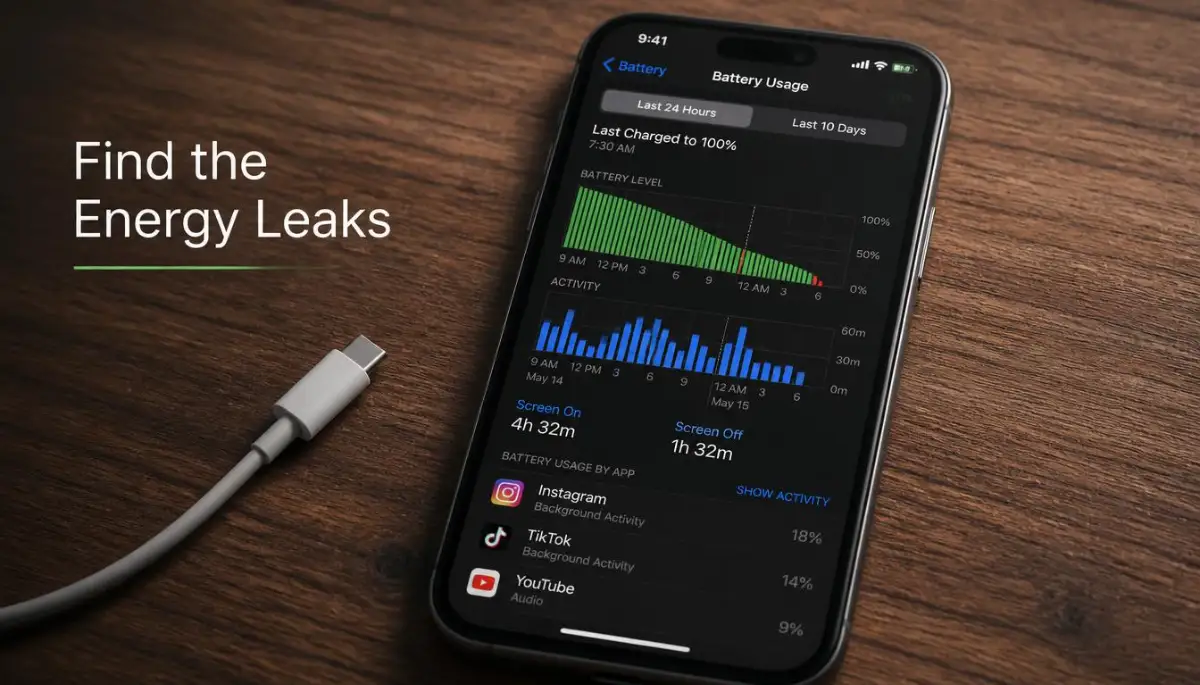
I went into my settings and checked "Battery Usage." I was shocked to see a simple weather app using 10% of my battery while I slept.
It was constantly checking the temperature every five minutes. I didn't need it to be that active.
I started restricting background activity for apps that I don't use every hour. This kept my phone much cooler and much faster.
You can see a great visual breakdown of how to manage these app settings in this video.
The Impact of Extreme Temperatures
I live in a place where it gets very hot in the summer. I used to leave my phone on the car dashboard while driving.
I noticed the battery would drop incredibly fast when the phone was hot. Heat is the number one enemy of battery health.
It causes the chemicals inside the battery to break down much faster than normal. If your phone feels hot to the touch, your battery is suffering.
I also learned that extreme cold is just as bad. Cold weather makes the internal resistance of the battery go up.
This is why your phone might die at 30% when you are outside in the snow. The battery simply cannot push the energy through the cold cells.
I now try to keep my phone in an inside pocket to keep it at body temperature. It sounds simple, but it saves your battery from permanent damage.
Searching for Signal: A Battery's Nightmare
I often go hiking in areas where the cell signal is very weak. I noticed my battery would be half empty by the time I reached the top.
When your phone has a weak signal, it turns up its radio power to find a tower. It is like the phone is "shouting" into the air, trying to be heard.
This shouting uses an incredible amount of energy. If you are in a basement or a rural area, your phone is working ten times harder than usual.
I started turning on "Airplane Mode" when I know the signal is bad. I can still take photos, but the phone stops fighting for a signal it can't find.
Once I am back in the city, I turn it back on. This habit alone saved my phone from dying during long trips.
It is all about being smart with how your phone uses its radios. Wi-Fi also uses much less power than cellular data, so I always connect to Wi-Fi when I can.
The Myths About Charging Habits
There is so much bad advice on the internet about charging. Some people say you must charge to 100% every time.
Others say you should never let it go below 50%. The truth is somewhere in the middle.
Lithium-ion batteries like to stay between 20% and 80%. This is the "happy zone" where the battery cells feel the least amount of stress.
I stopped charging my phone overnight. Leaving it at 100% for six hours while it is still plugged in creates heat.
This heat slowly degrades the battery over months and years. I now charge my phone in the evening and unplug it before I go to bed.
This small change in my routine has helped my battery health stay at 100% for much longer. It is about understanding the limits of the technology we carry.
The "Vampire" Syncing Services
We love having our photos and emails updated instantly across all devices. But this constant "syncing" is another reason why smartphone battery drains fast.
Every time you take a photo, your phone tries to upload it to the cloud. This uses the processor and the Wi-Fi at the same time.
If you take twenty photos, your phone is working overtime for the next ten minutes. I changed my settings to only sync when the phone is charging.
I also turned off "Auto-Update" for my apps. I prefer to update them manually once a week when I am at home.
This prevents my phone from starting a giant download while I am out and about. It gives me control over when my battery is used.
You don't need every app to be perfectly updated every second. Most of the time, a daily sync is more than enough for our needs.
Why System Updates Actually Matter
I used to avoid system updates because I was afraid they would slow my phone down. I heard rumors that companies used updates to kill old batteries.
While some mistakes happen, most updates actually include "power profiles." These are tiny pieces of code that help the hardware run more efficiently.
Developers are always finding ways to make the software use less energy. When I finally updated my old phone, the battery life actually got better.
The new software was better at putting idle apps to sleep. It also optimized how the processor handled small tasks.
If you are running very old software, your phone might be using more power than it needs to. I now keep my phone updated as soon as a stable version is released.
It is part of keeping the device healthy and fast. A modern system is usually a more efficient system.
Cleaning Your Charging Port
This sounds like a weird tip, but it is very practical. I once thought my battery was broken because it took six hours to charge. I looked into the charging port with a flashlight. It was filled with pocket lint and dust from my jeans.
This lint was preventing the cable from making a solid connection. It caused the charger to work slowly and create a lot of heat.
I carefully cleaned it out with a small toothpick. Suddenly, my phone was fast-charging again.
When your phone charges slowly, it stays warm for a longer time. As we discussed, heat is bad for the battery.
A clean port means a fast charge and a cool battery. It is a two-minute fix that can save your battery from a slow death.
The Power of "Lite" Apps
If you use a lot of social media, you probably know how heavy those apps are. They use a lot of memory and a lot of battery.
I started using "Lite" versions of apps like Facebook and Messenger. They are designed for phones with less power, but they work great on high-end phones too.
They use significantly less battery because they don't have all the heavy animations. They focus on the basic features that I actually use.
This made a huge difference in my daily battery drain. I could browse for an hour and only lose a few percentage points.
It is about being intentional with what you install. You don't always need the heaviest version of an app to get the job done.
Final Thoughts on Battery Health
Our phones are our most important tools. Taking care of the battery is like taking care of the heart of the device.
By understanding why smartphone battery drains fast, we can take back control. We don't have to be afraid of the red icon anymore.
Calibration is the first step, but daily habits are what keep the battery strong. Be mindful of heat, brightness, and background apps.
You will find that your phone lasts longer and performs better. You will feel more confident when you leave the house.
A well-calibrated phone is a reliable partner in your daily life. It is worth the effort to learn these simple steps.
I hope you never have to search for a charging outlet at an airport like I did. Your phone is ready to last all day; you just have to show it how.
Stay tuned for more tips on keeping your tech running like new. Your digital life is about to get much more powerful.
Expert Secrets for Long-Term Battery Health
Once I learned how to calibrate my phone correctly, I realized that calibration is just the emergency fix. The real goal is to stop the battery from getting confused or damaged in the first place.
Think of your phone battery like a physical muscle. If you push it too hard without rest, it will eventually tear and lose its strength forever.
One of the most powerful secrets I found is the "20-80 Rule." Scientific studies on lithium-ion batteries show that keeping your charge level between 20% and 80% can double the life of your battery cells.
When you push a battery to 100%, the internal pressure rises, creating heat and stress. Similarly, letting it drop to 0% causes a chemical imbalance that makes it harder for the battery to "wake up" later.
I started keeping my phone within this middle range, and my "battery health" percentage stopped dropping. It is much like beyond automation how creatives and ai work better together because you are finding the perfect balance between the machine's power and your own habits.
If you want to keep your phone for many years, you must avoid "Fast Charging" every single night. While fast chargers are convenient, they generate a lot of heat, which is the number one killer of electronics.
I personally use a slow, 5-watt charger for overnight charging and keep the fast charger only for emergencies. This small change reduced the heat my phone produced while I slept, saving the battery from "cooking" itself.
According to research published on Battery University, heat is the primary factor in lithium-ion degradation. Just a small increase in temperature can significantly shorten the number of charge cycles your phone can handle.
I also learned to treat my phone's energy like a limited resource, similar to how people are making simple household swaps to shrink your plastic footprint easily. You want to reduce waste wherever you can so that the main resource lasts much longer.
Another pro-level tip is to disable "Background App Refresh" for everything except your most needed messaging apps. Many apps are constantly checking for new data even when your screen is off, which creates "micro-drains" that confuse the battery gauge.
By taking control of these settings, you are essentially telling the phone's "brain" exactly what to prioritize. This leads to a much more stable battery percentage and fewer sudden drops in power throughout the day.
I found that my phone stayed at 100% calibration much longer once I stopped letting apps "talk" to the internet behind my back. It gave me a sense of peace knowing that if my phone said 50%, it actually meant 50%.

Pitfalls That Secretly Kill Your Phone’s Power
I have seen so many people make the same mistakes over and over again, and it honestly hurts to watch. They spend a lot of money on a beautiful device and then treat it in ways that destroy its value in months.
The biggest mistake is using cheap, unbranded charging cables that you buy at a gas station or a random corner shop. These cables often lack the safety chips needed to regulate the flow of electricity into your phone.
Using a bad cable is like why payday loans cost too much and what to do instead. It seems like a quick and cheap fix, but it ends up costing you much more in the long run through hidden damage.
I once ruined a perfectly good smartphone by using a cheap knock-off charger. The phone got so hot that the screen started to yellow, and the battery never held a full charge again.
Another trap people fall into is using "Battery Saver" apps from the app store. Most of these apps are actually full of ads and tracking software that drain your battery even faster.
Your phone already has the best battery-saving software built into its settings. You don't need a third-party app to tell you to turn down your brightness or close apps.
I also noticed that people leave their GPS, Bluetooth, and Wi-Fi Scanning on even when they don't need them. This is like leaving all the lights on in your house while you are at work.
It creates a "vampire drain" that slowly eats away at your power. This reminds me of how people forget to block smart tv tracking simple settings to change right now to save their data and privacy.
When you ignore these small "leaks," they eventually become a giant flood that leaves you with a dead phone at the worst possible time. It is a terrible feeling to reach for your phone to call for a ride, only to find it has died in your pocket.
If you don't avoid these pitfalls, you will find yourself in a cycle of constant charging and frustration. You might even end up needing a costly repair or a whole new device much sooner than you planned.
The Danger of Constant Fast-Charging and Heat
I used to be obsessed with having my phone at 100% as fast as possible. I thought that more speed was always better.
But heat is a silent killer that works slowly inside your phone's casing. When your phone feels hot while charging, the chemicals inside the battery are literally breaking down.
Research from ScienceDirect indicates that high temperatures cause the internal resistance of the battery to rise. This means the battery has to work harder just to do the same tasks it used to do easily.
It is a lot like overcoming college burnout real recovery strategies for high achievers. If you keep pushing at maximum speed without cooling down, you eventually burn out and lose your ability to perform.
I learned to charge my phone in a cool, flat area rather than on a soft bed or under a pillow. Soft surfaces trap the heat against the phone, which can lead to permanent battery swelling.
A swollen battery is a serious safety risk and can even crack your phone's screen from the inside. This is a nightmare scenario that I want everyone to avoid.
It is also a huge mistake to ignore software updates that mention "thermal management." These updates often include better ways for your phone to stay cool while performing heavy tasks.
If you avoid these updates, you are missing out on the latest protection for your hardware. Always prioritize the health of your battery over the minor inconvenience of a five-minute update.
Your New Path to a Stress-Free Battery Life
Looking back at my own struggles, I realize that having a reliable phone changes how I feel about my day. I no longer feel that panic when I see my battery drop to 30%.
I know my phone is calibrated, and I know exactly how much time I have left. I have taken control of my tech instead of letting it control me.
Everything we discussed, from calibration to the 80/20 rule, is about building a better relationship with your tools. You want a phone that is ready for anything, whether it's a long work day or an emergency call.
Just like why hosting server location can make or break your website speed, having the right setup makes everything feel smooth and fast. You don't have to be a tech expert to enjoy these benefits.
You just need to be a little bit more mindful of how you charge and use your device. Small habits add up to big results over time.
I encourage you to start your first calibration tonight. Follow the steps carefully and see if your phone's "low battery" behavior improves.
Then, try the 80/20 charging rule for a week. I promise you will feel a sense of relief when you realize you aren't constantly worried about finding a charger.
Your smartphone is a miracle of modern engineering. With a little care, it can stay healthy and powerful for a very long time.
It is your digital companion, and it deserves to be treated well. I am so glad I learned these secrets, and I am even happier to share them with you.
I believe that everyone can have a phone that lasts all day without stress. It just takes a few minutes of your time to set things right.
I personally felt a huge weight lift off my shoulders once I stopped worrying about my phone dying. My phone is now a tool that gives me freedom rather than taking it away.
I want you to experience that same freedom today. Take the first step and give your battery the care it truly needs.
Real Questions People Ask About Battery Care
Is it okay to use my phone while it is charging?
You can use your phone, but it is better to avoid heavy tasks like gaming or high-definition video editing. These tasks generate extra heat on top of the heat already coming from the charger. This "double heat" can age your battery much faster than normal use.
Does "Dark Mode" really save my battery?
Yes, but mostly if your phone has an OLED or AMOLED screen. These screens can turn off individual black pixels, meaning they use zero power for the dark areas. If you have an older LCD screen, dark mode won't save much power, but it is still easier on your eyes.
Should I always charge my phone to 100%?
It is fine to do it occasionally, but doing it every day can wear out the battery. Think of it like filling a balloon to the very top; it puts a lot of tension on the material. Try to unplug around 80% or 90% to keep the battery cells relaxed and healthy.
What happens if I don't calibrate my battery?
Nothing "dangerous" will happen, but your phone might become very annoying to use. It may suddenly shut down while showing 15% or stay at 100% for a long time and then drop very fast. Calibration keeps the "fuel gauge" accurate so you aren't caught by surprise.
Can a software update fix a physically dying battery?
No, software cannot fix a battery that has physically worn out due to age. However, a good update can make the phone more efficient so the dying battery lasts a little longer. If your battery is physically bulging or over three years old, it might be time for a professional replacement.
Why does my phone die faster in cold weather?
Cold weather slows down the chemical reactions inside the battery cells. This makes the phone think the battery is empty even when it has plenty of charge left. Keeping your phone in an inside pocket close to your body heat usually solves this problem instantly.
Disclaimer: The information provided in this guide is for educational and informational purposes only. While battery calibration and maintenance are generally safe, always consult your device manufacturer's guidelines for specific care instructions. We are not responsible for any issues that may arise from improper handling of your mobile device or battery.