
The Night I Almost Deleted My Entire Website Out of Frustration
Building a website is fun until you realize your "digital house" is a total disaster. I spent months throwing blog posts, products, and forum threads into one giant pile, only to find out that Google and my readers were both getting lost. If you feel like your site is a maze that even you can't navigate, don't delete your domain just yet. Let’s talk about how fixing your site structure can actually save your business and your sanity.
Every time I wanted to add something new, I felt a deep sense of dread. I didn't know where to put new pages without breaking the old ones. It felt like I was living in a house where the kitchen was in the bathroom and the bed was in the garage.
I spent hours clicking through my own menus, getting more lost by the minute. My head was spinning, and I honestly thought about just quitting. I felt like a failure because I couldn't even keep my own digital home in order.
The Mental Toll of a Messy Online Business
When your website is unorganized, it does more than just look bad. It creates a constant, heavy weight on your chest every time you log into your dashboard. You start to worry about your visitors getting frustrated and leaving before they even read a single word.

🚀 Quick Lessons from My Mistakes:
- Folders (Subdirectories) are for SEO: Keep your blog and articles in folders to keep your domain power high.
- Subdomains are for Tools: Use these for support forums or shops that use different software.
- Redirects are Non-Negotiable: If you move content, always use a 301 redirect or you'll lose your traffic overnight.
- Simple Wins: Don't overcomplicate things. If a folder works, don't build a subdomain.
That feeling of being overwhelmed can ruin the joy of creating content. You stop focusing on your ideas and start fighting with your URLs and folders. It is a stressful cycle that drains your energy and makes you want to walk away from it all.
Understanding the True Cost of Poor Website Architecture
Most people think a messy site just needs a new theme. I learned the hard way that the problem is usually much deeper than just the design. It is about how the folders and addresses of your site are built from the ground up.
If your visitors cannot find what they need in two clicks, they will leave. This lost traffic means lost opportunities and wasted potential for your brand. You are essentially leaving money on the table because your site is too hard to navigate.
The stress of managing a chaotic site also leads to burnout. You find yourself fixing technical errors instead of growing your business. This constant fire-fighting is not why we start blogs or online shops in the first place.
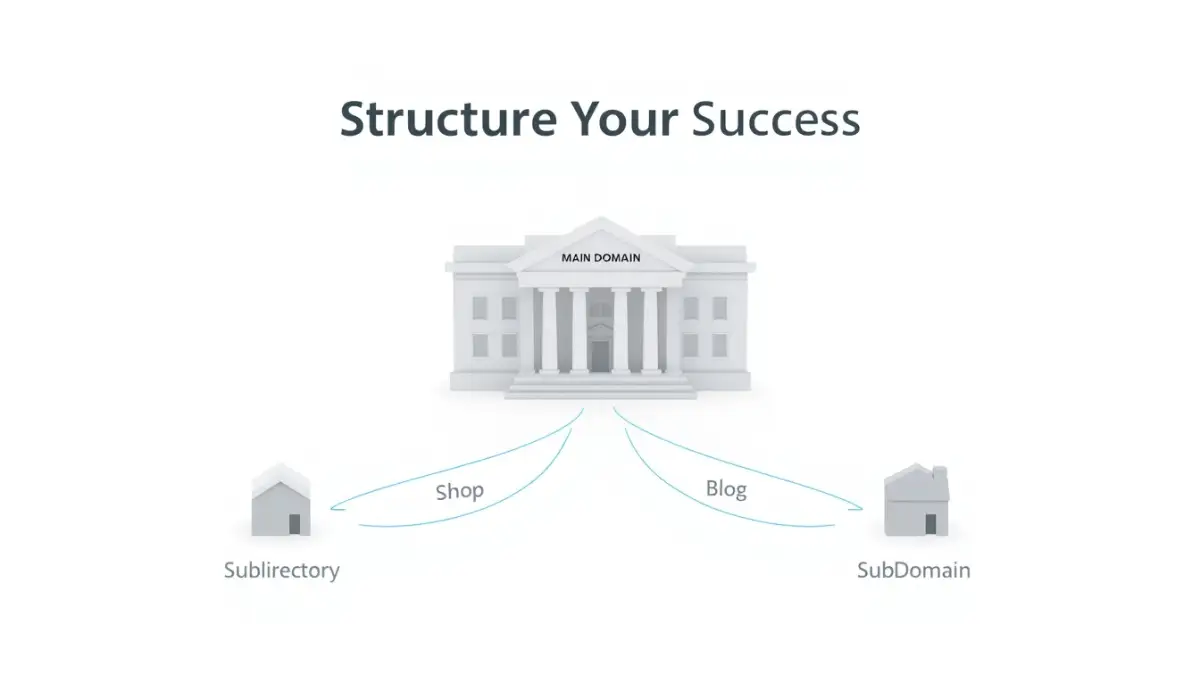
Choosing the Right Path for Your Digital Content
The first thing I had to learn was that there is no one-size-fits-all answer. You have two main tools in your belt: subdomains and subdirectories. Both are great, but they serve very different purposes depending on what you are trying to do.
Think of your website like a large library. A subdirectory is like a new shelf in the same room. A subdomain is like building a whole new wing on the other side of the property.
At a Glance: Which One Should You Pick?
Knowing when to use each one saved my sanity. It allowed me to separate my store from my blog without losing the power of my main name. This was the turning point where I stopped feeling like an amateur and started acting like a pro.
When a Subdirectory is Your Best Friend for SEO
I found that subdirectories are perfect for keeping all your "link juice" in one place. If you have a blog that is part of your main site, keep it in a folder. This tells search engines that all this great content belongs to the same authority.
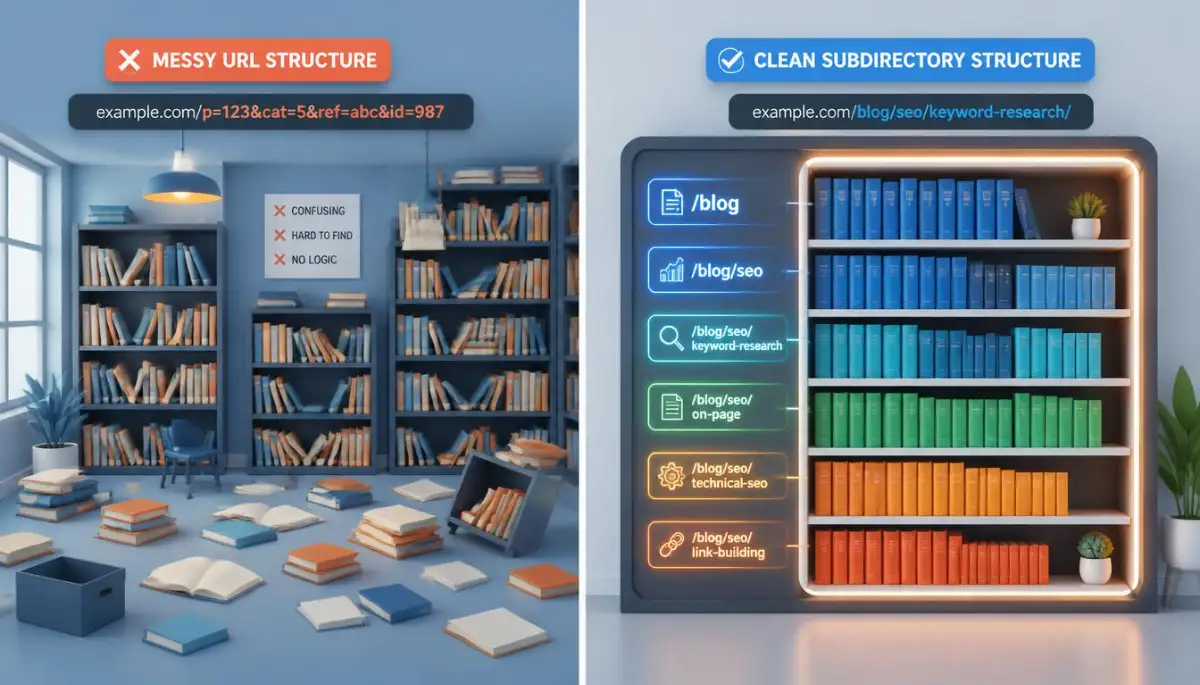
It is much easier to manage because you only have one main installation to look after. You don't have to worry about logging into five different places just to update a plugin. This simplicity is a lifesaver when you are working alone.
I used to think I needed a new domain for every idea I had. I was so wrong and it cost me hundreds of dollars in registration fees. Now, I just create a new folder and start writing immediately.
Making the Most of Subdirectories for User Trust
Visitors feel safer when they stay on the same URL path. When they see yourdomain.com/blog, they know they are still with you. It creates a seamless journey that keeps people on your site for a longer time.
This trust is what turns a random reader into a loyal fan. They don't feel like they are being bounced around to different websites. It keeps your branding consistent and professional across every page.
You can organize your content into clear categories like /tips, /guides, or /news. This makes it very easy for people to find exactly what they are looking for. A clean structure is a happy structure for everyone involved.
If you want to see exactly how to set these folders up in your hosting panel, this video makes it look incredibly easy.
When a Subdomain is the Smarter Strategic Choice
There are times when you need a clear wall between your sections. I realized that my customer support forum didn't really fit inside my main blog folders. It needed its own space to breathe and its own unique layout.
Subdomains like support.yourdomain.com are perfect for this. They allow you to use different software for different parts of your site. You can run a shop on one system and a blog on another without any conflicts.
This is also great if you are targeting different countries or languages. You can have es.yourdomain.com for your Spanish readers. It gives them a dedicated experience that feels tailor-made for their specific needs.
Managing the Technical Load of Multiple Subdomains
Using subdomains means you are essentially running separate websites. While this gives you freedom, it also means you have more to maintain. You will need to handle security and updates for each one individually.
I found that this was great for keeping my main site fast. If the forum gets thousands of people at once, it won't slow down my main homepage. This separation of resources is a smart move for very large projects.
It also helps with your branding if you have a very diverse set of products. A subdomain tells the visitor, "This is part of the family, but it is its own unique thing." It provides clarity in a world of online confusion.
Balancing Your Brand Power Across Your Site
One thing I struggled with was worrying about my search engine rankings. I heard that subdomains are seen as totally different sites by some search engines. This made me nervous about starting fresh with a new subdomain.
However, if your content is truly different, a subdomain is better for the user. Google is smart enough to see the connection between your main name and your subdomain. Don't let fear stop you from making the right choice for your visitors.
Myths I Used to Believe
- Myth: Subdomains will kill your SEO rankings.
- Fact: Not true! Google treats them as part of your brand, but they just take a bit longer to "warm up" in search results.
- Myth: You need a subdomain for every category.
- Fact: Please don't do this. It makes your site a nightmare to manage. Stick to folders unless you are running completely different software.
Focus on the person reading your site first, and the search engines will follow. If a subdomain makes sense to a human, it will eventually make sense to a computer. Trust your instincts when it comes to organizing your hard-earned content.
Organizing Content Based on User Intent
Before you create a new section, ask yourself what the user wants to do. Are they there to read an article, or are they there to buy a physical product? These are two very different goals that require different structures.
I like to use subdirectories for anything that supports my main message. If it is an educational post, it stays in a folder. If it is a separate tool or a massive community area, it gets a subdomain.
This logic keeps your site clean and easy to understand. It prevents you from having a "junk drawer" of random pages. Every piece of content has a home that makes sense to everyone who visits.
Avoiding the "Everything is a Priority" Trap
When I first started, I thought every category needed to be on the front page. This made my site look like a cluttered newspaper from the old days. I had to learn to tuck things away into a proper hierarchy.
Your main menu should only show the most important paths. Use your subdirectories to hold the deep, detailed information. This keeps your homepage clean and inviting for new people who just found you.
Think of your homepage like a front door and your subdirectories like the rooms in your house. People don't need to see the laundry room as soon as they walk in. Give them a nice place to sit first, then show them the rest of the house.
The Secret to Long-Term Website Scalability
Building your site correctly now means you won't have to rebuild it later. I had to learn this lesson by doing the work twice. It was painful, but it taught me the value of a solid foundation.
Plan for where you want to be in five years, not just where you are today. If you think you might add a school or a large shop later, leave space for it in your domain plan. This foresight will save you hundreds of hours of technical headaches down the road.
A well-organized site grows with you. It doesn't become a burden that holds you back. It becomes a powerful tool that helps you reach more people and share your message with the world.
Keeping Your Site Architecture Clean and Simple
At the end of the day, simplicity always wins. Don't make ten subdomains just because you think it looks cool. Only add a new branch when it is absolutely necessary for your user's experience.
I always try to stay in subdirectories as long as possible. It keeps my life simple and my SEO strong. I only break out into a subdomain when the content is so different that it would confuse my readers to keep it together.
This "less is more" approach has made my digital life so much easier. I no longer spend my nights fighting with my server settings. I spend them creating new things and helping my community, which is what I love to do.
Final Thoughts on Building Your Digital Empire
The journey from a messy site to an organized one is a huge relief. You will feel a sense of pride every time you look at your clean URLs. It shows your visitors that you care about their time and their experience.
Take it one step at a time and don't try to fix everything in one hour. Start by grouping your most popular posts into a few clear folders. Once you get the hang of it, the rest of the site will fall into place naturally.
You have the power to create an online space that is both beautiful and functional. Don't let the technical terms scare you away from your dream. With a little bit of planning, your website can become the professional home you always wanted it to be.
Smart Strategies for Keeping a Large Website Running Smoothly
Once you decide how to map out your site, you need a plan to keep it fast. I found out the hard way that a big site can get slow very quickly. If you have a lot of folders, your server has to work harder to find the right files.
One secret I learned is to use a Content Delivery Network or CDN. This keeps a copy of your site on servers all over the world. This is why hosting server location can make or break your website speed even if you have a perfect structure.
If you use subdomains, you need to manage your security certificates very carefully. Each subdomain often needs its own SSL setup unless you buy a special wildcard certificate. I once forgot to update a subdomain and my visitors saw a scary "Not Secure" warning for three days.
Managing your site structure also means keeping an eye on your database. As you add more sections, your database grows and can become a bit messy. I make it a habit to clean up my database every month to keep things snappy.
You should also think about how you handle your tracking and analytics. Using subdomains means you might see your traffic split into different reports. You have to set up cross-domain tracking so you can see the whole picture of your visitor's journey.
Just like you would block smart tv tracking simple settings to change right now to save your privacy, you should block search bots from crawling useless folders. Things like your admin files or private testing areas should stay hidden. This saves your server power for the real visitors who want to read your content.
You also need a very strong backup plan for a complex website. If one part of your subdirectory structure breaks, it might affect the whole site. I keep three different copies of my site in separate cloud storage areas just to be safe.
Try to keep your URL paths as short as possible. Instead of having domain.com/blog/category/post-name, try to go with domain.com/blog/post-name. Shorter links are easier for people to remember and share on social media like Pinterest.
If you are running a shop on a subdomain, make sure the "Home" button leads back to your main site. It sounds simple, but I see so many pros get this wrong. You don't want to trap your users in a loop where they can't get back to your main articles.
Always test your site on a mobile phone after making structural changes. What looks like a nice menu on a desktop might look like a disaster on a small screen. I spend about an hour every week just clicking through my site on my phone to find broken links.
Organizing your site is a long-term game that requires patience. You might not see the benefits on day one, but your future self will thank you. A clean site is much easier to sell or hand over to a new team if you ever decide to move on.
The way you name your folders also matters for your long-term growth. Use simple, descriptive words that will still make sense five years from now. Avoid using slang or temporary names that might go out of style quickly.

Dangerous Pitfalls That Can Break Your Website Organization
One of the biggest mistakes I ever made was changing my URL structure without using redirects. I thought I could just move my files and the search engines would figure it out. Instead, I lost half of my traffic overnight because all my old links were dead.
If you move a page from a subdirectory to a subdomain, you must use a "301 Redirect." This tells everyone that the content has moved permanently to a new home. Without this, your visitors will just see a 404 error page and leave your site immediately.
Another huge error is having "duplicate content" across your different sections. If you have the same article in two different folders, search engines won't know which one to show. This makes your pages compete against each other, which is a total waste of your hard work.
Sometimes people forget to link their subdomains back to their main site properly. This makes your brand feel disconnected and strange to the user. You want your digital empire to feel like one big family, not a group of strangers living under the same name.
Making a mistake in your site structure can feel as bad as when why first time personal loans fail and how to fix it because of poor planning. You put in the effort but get no results because the foundation was shaky. Take your time to draw your site map on paper before you touch a single setting on your server.
I once ignored my mobile users when I was setting up a complex menu. I thought most people were using computers like I was. When I checked my stats, I saw that 80% of my visitors were on phones and they couldn't even click my links.
Don't let your "category" pages become thin and useless. If a subdirectory only has one post in it, you probably don't need that subdirectory yet. Wait until you have at least five related posts before giving them their own special folder.
The cost of fixing a messy site later is always much higher than doing it right the first time. It is a bit like how safe emergency cash why payday loans cost too much and what to do instead shows that quick fixes usually lead to bigger debts. Spend the time now to plan your site correctly so you don't pay for it later with lost traffic.
I also see people using "underscores" in their URLs instead of "hyphens." Search engines see my_page as one word, but they see my-page as two separate words. Always use hyphens to make your addresses easy for computers to read and understand.
Lastly, never forget to update your sitemap file after you change your structure. This file is like a map you give to search engines so they can find every corner of your site. If the map is wrong, the search bots will get lost and stop visiting your new pages.
Your Roadmap to a Stress-Free Professional Website
Cleaning up your website is one of the most rewarding things you can do as a creator. It feels like taking a deep breath after being stuck in a dusty room. You will feel more confident and your visitors will finally be able to see the value you provide.
I used to be so afraid of the technical side of hosting and domains. Now, I see it as a puzzle that I can solve to make my business better. You don't need to be a genius to have a great site; you just need to be organized and consistent.
Building a solid structure is a form of smart budgeting methods for self-employed pros with unstable income because it protects your most valuable asset. Your website is your digital office, and keeping it clean ensures your business can keep running no matter what.
Every successful person I know started with a bit of a mess. The difference is that they decided to stop and fix it before it got out of control. You are doing the same thing right now by learning how to build a better home for your ideas.
Stay focused on your goals and don't let the small details pull you down. If a choice feels right for your reader, it is almost always the right choice for your business too. Trust your voice and keep building your dream one folder at a time.
I want you to know that you can handle this technical stuff even if it feels scary today. My first site was a complete disaster, but I learned from every mistake I made. Now, I look back and I am so glad I didn't give up when things got complicated.
The best time to organize your website was the day you started, but the second best time is right now. I truly believe that taking this step will change the way you see your online business forever.
Common Questions About Site Organization
Should I move my existing blog from a subdomain to a subdirectory?
If your blog is struggling for traffic, moving it to a folder can give it a big boost from your main domain's power. Just remember to use 301 redirects for every single link so you don't lose the visitors you already have. This move is usually worth the effort for long-term SEO growth.
Is it expensive to set up multiple subdomains?
Most hosting companies allow you to create as many subdomains as you want for free. The real "cost" is the time it takes to set them up and keep them updated. If you are a one-person team, try to keep your setup as simple as possible to avoid burning out.
Do subdirectories slow down my website more than subdomains?
If you have thousands of pages, a subdirectory structure can slightly increase the load on your server's file system. However, for most small to medium blogs, the difference is so tiny that you won't even notice it. Using a good caching plugin will solve almost any speed issues you might face.
Can I use a mix of both subdomains and subdirectories?
Yes, many large websites use both to stay organized. For example, you might have your main content in folders but keep your "Member Area" on a subdomain. This gives you the best of both worlds by keeping your SEO strong while separating your technical tools.
Will changing my structure hurt my current rankings?
There is always a small risk when you change your URLs, but if you use proper redirects, your rankings should bounce back quickly. It is much better to have a short period of movement than to stay stuck with a bad structure that holds you back forever. Think of it as a small step back to take a giant leap forward.
Disclaimer: Website architecture and domain management involve technical changes that can affect your site's visibility and performance. While this guide provides general advice, every server and website setup is unique. Always create a full backup of your site before making any structural changes to your URLs or hosting settings. Consult with a professional developer if you are unsure about modifying your DNS records or server configurations.